Revenue, expenses and payroll out of Excel

Moving a salon's revenue, expenses and payroll out of Excel so the owner can plan ahead.

Read the case studyCan't share the live app or prompts. Screenshots show the real interface with made-up data.
Moving a salon's revenue, expenses and payroll out of Excel so the owner can plan ahead.

The problem

01 / 04

Payroll recomputed

Every pay period, payroll was rebuilt in Excel. Hours, commissions and deductions all had to be checked by hand before anyone could be paid.

Salon financesBefore · spreadsheets
Payroll_Mar_1-15.xlsx
Ana42 hrs=SUM(C2:C31)*0.4
Joy38 hrs=VLOOKUP(A2,Staff!A:D,4)
Mia40 hrs=IF(D2>500,D2*0.1,0)
Total—#REF!
Formula error · totals checked by hand
3separate files
1broken total
0shared view
02 / 04

Revenue and expenses in separate files

Revenue and expenses lived in different files. Getting the full picture meant opening several sheets and piecing the totals together.

Salon financesBefore · spreadsheets
Revenue.xlsx
Gel manicureAna650
PedicureJoy500
Nail artAna850
Gel removalMia250
Expenses.xlsx
SuppliesMar 023,200
RentMar 0518,000
UtilitiesMar 092,450
SuppliesMar 141,900
3separate files
1broken total
0shared view

03 / 04

No clear view of profit

Because the numbers were scattered, net profit was never obvious. The owner had to calculate it manually whenever she needed an answer.

Salon financesBefore · spreadsheets

March totals

Revenue₱48,250
Expenses₱25,550
Payroll#REF!

Three separate files have to agree first.

Net profit, March

₱ ?

Manual calculation
3separate files
1broken total
0shared view

04 / 04

Hard to plan ahead

Planning the next month relied on incomplete totals. Sales goals and expense budgets involved more guesswork than reliable data.

Salon financesBefore · spreadsheets

April plan

Set next month's targets

Sales goal?No reliable baseline
Expense budget?No reliable baseline
Planning starts after the spreadsheets are reconciled.
3separate files
1broken total
0shared view
What I built

Three things it does really well.

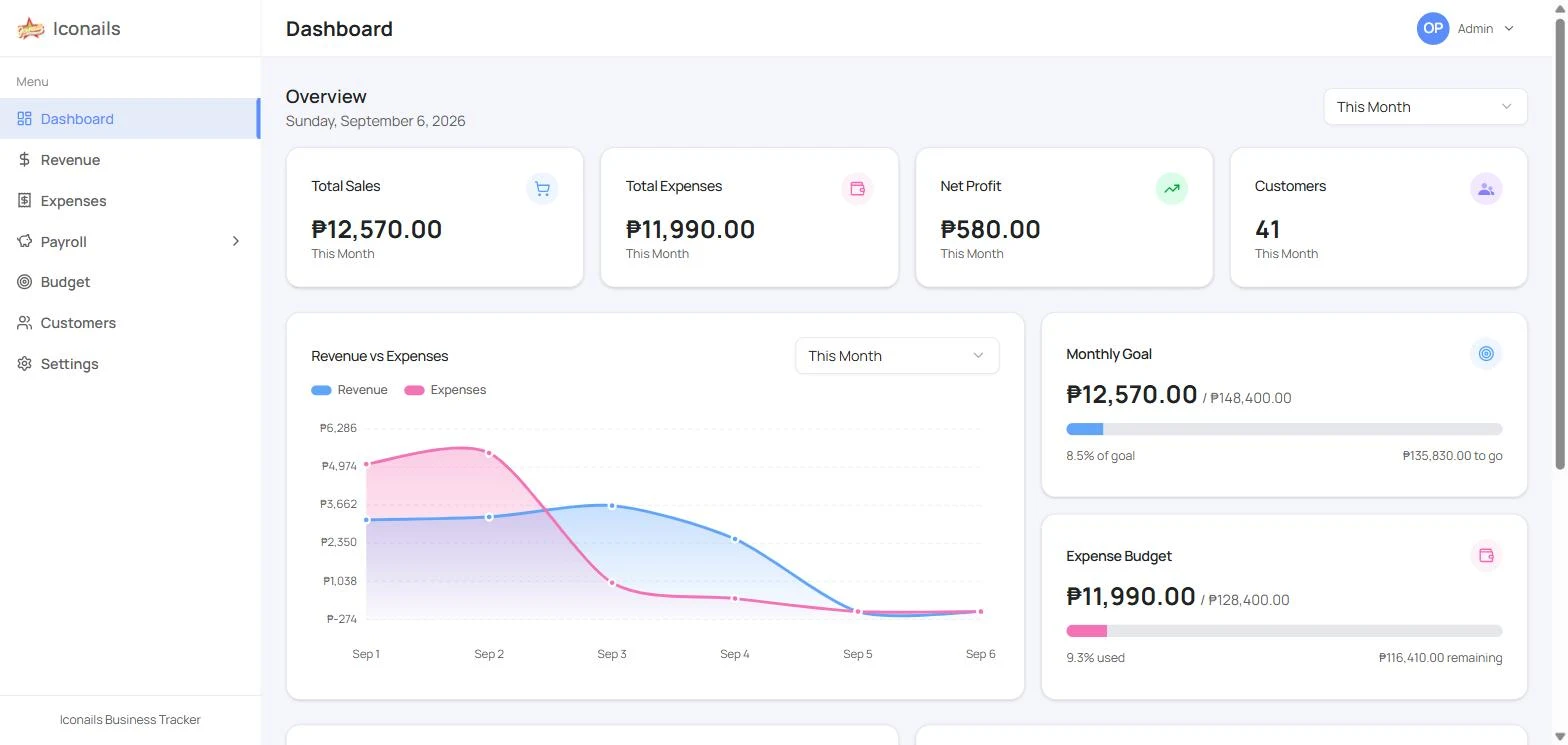
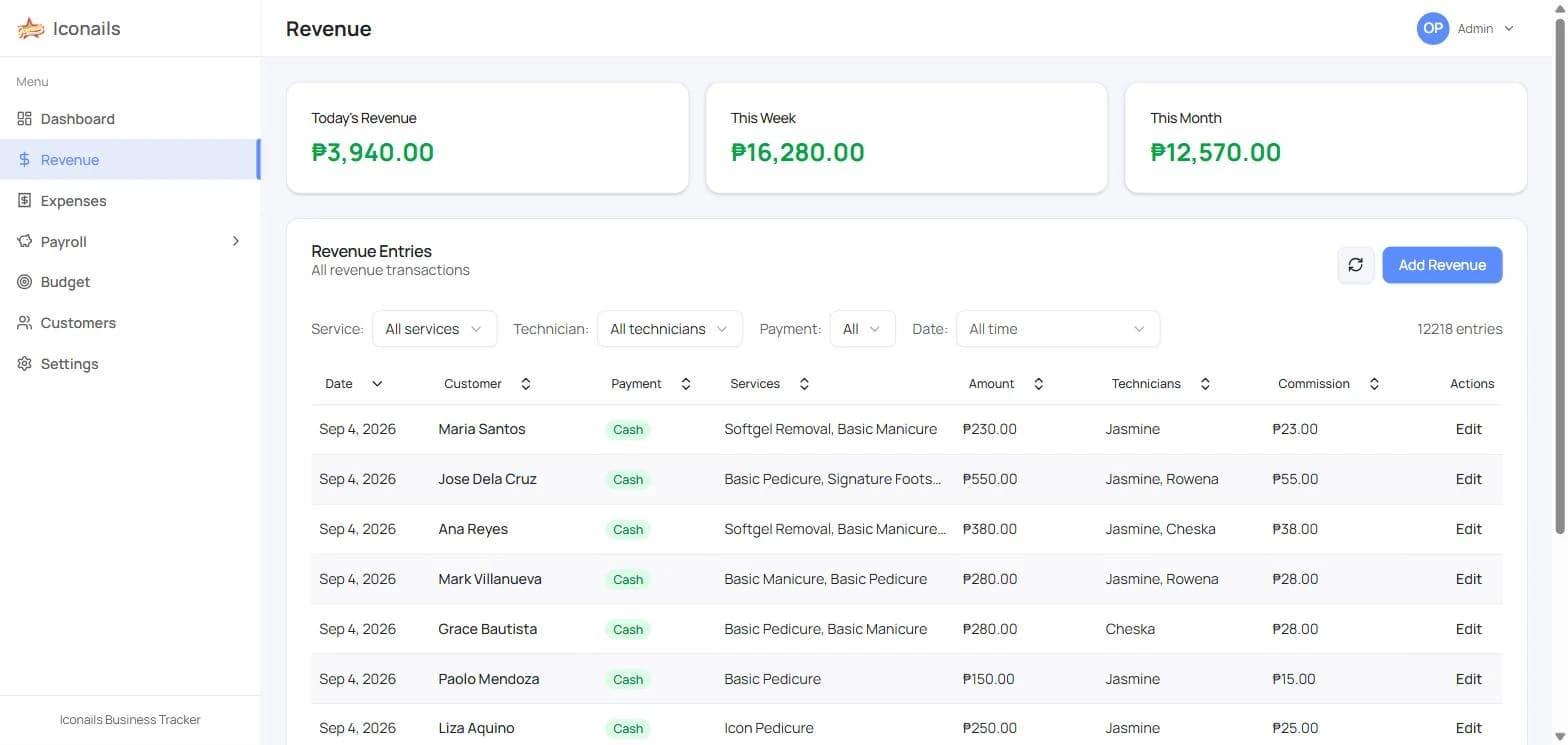
One dashboard where revenue and expenses are logged as they happen and payroll totals compute from what's entered. The owner still runs payroll, but no longer rebuilds it in a spreadsheet, and with everything in one place they can set budgets and goals from real numbers.

Tracking

Every peso in and out

Revenue is logged by service, technician and payment type, and expenses by category, so nothing lives in a side spreadsheet.

  • Sales, expenses and net profit on one dashboard
  • Customer visit history and repeat tracking
Iconnails — Every peso in and out
Forecasting

Plan the month, not just record it

With revenue and expenses tracked properly, the owner sets a monthly sales goal and expense budget and sees progress against both as the month goes.

  • Revenue vs expenses over time
  • Monthly goal and budget progress
Iconnails — Plan the month, not just record it
Payroll

No more rebuilding payroll in Excel

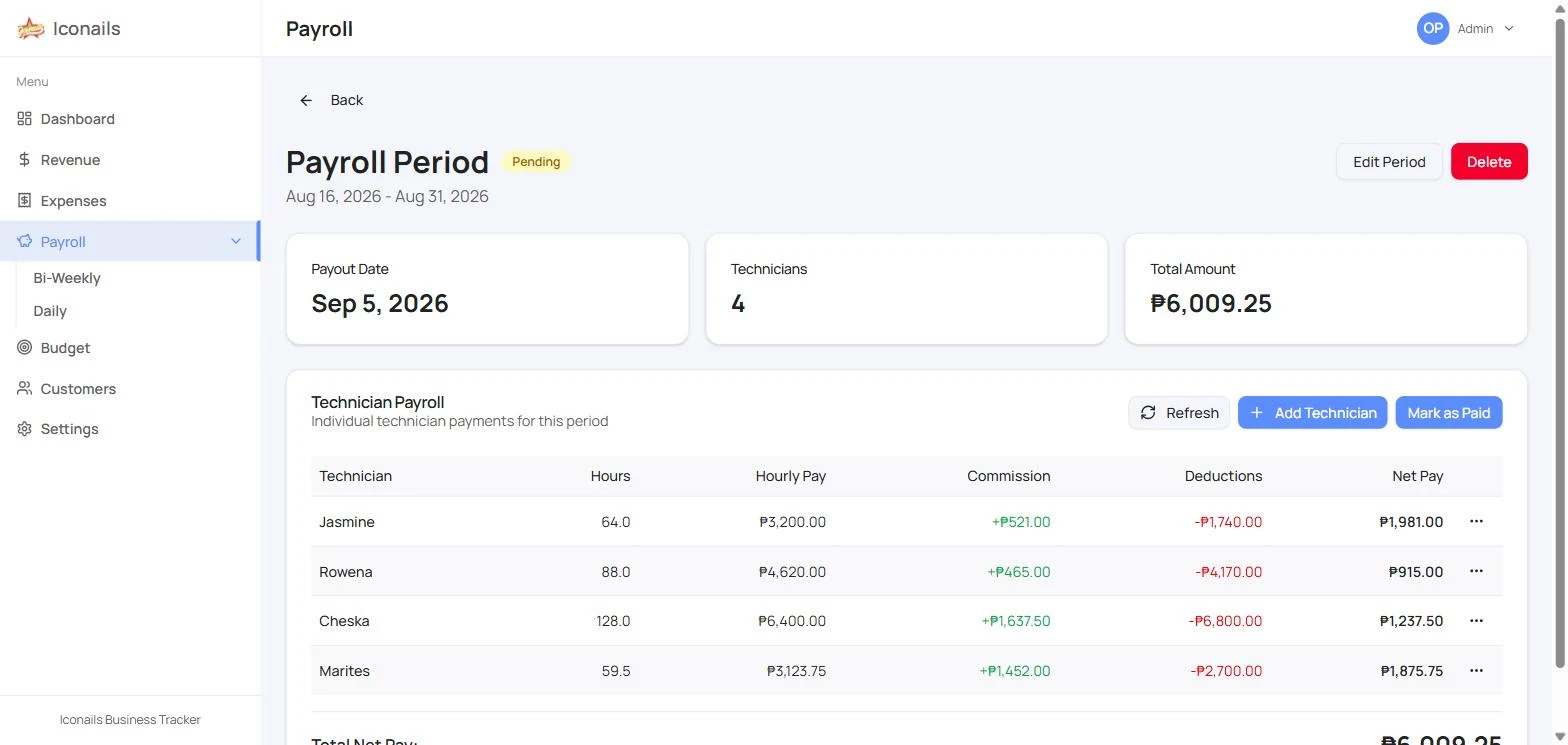
Payroll is still run by the owner, but hours, commission, deductions and net pay compute from what's entered, and every period stays on record.

  • Per-technician breakdown instead of spreadsheet formulas
  • Past pay periods kept with payout status and totals
Iconnails — No more rebuilding payroll in Excel

The outcome

1Dashboard replacing separate Excel sheets
4Modules in one place
1–2 hrsSaved every bi-weekly payroll, no formulas to rebuild

Gallery

Overview dashboard — sales, expenses, net profit
Revenue entries by service, technician and payment type
Payroll periods with payout status and totals
Per-technician hours, commission, deductions and net pay
Customer list with visit history and repeat tracking

Tech stack used

Built with Next.js, TypeScript, Tailwind CSS, and Supabase.

Working on something similar?

Let's build
yours next.

Start a projectStart a project